Planning a funeral online in nine steps
An order form in WooCommerce for Bedemand Haack, where families put together the funeral step by step, and the funeral home calls them back afterwards.

I built the solution for Bedemand Haack on my own over 3–4 months in 2025 while employed at Brating, using AI as a tool along the way.
The problem
Families used to call the funeral home and fill in paper forms with every choice. The funeral home wanted to let them put the funeral together online instead: area, ceremony, coffin, urn, flowers, ribbons and the practical details.
Nothing is paid online. The form is a request for a call, where the family outlines how they want the funeral to be. That’s a poor fit for WooCommerce, which is built to sell products with a cart and payment.
The solution
Composite Products provides the steps themselves. I built the rest with WordPress and WooCommerce hooks in a child theme, so neither WooCommerce nor the plugin was modified, and both can still be updated.
- From cart to call. “Add to cart” became “Continue”, the cart is skipped, and families go straight to checkout to send their request.
- The price follows along. A floating price box shows the estimated total as you choose. More on that below.
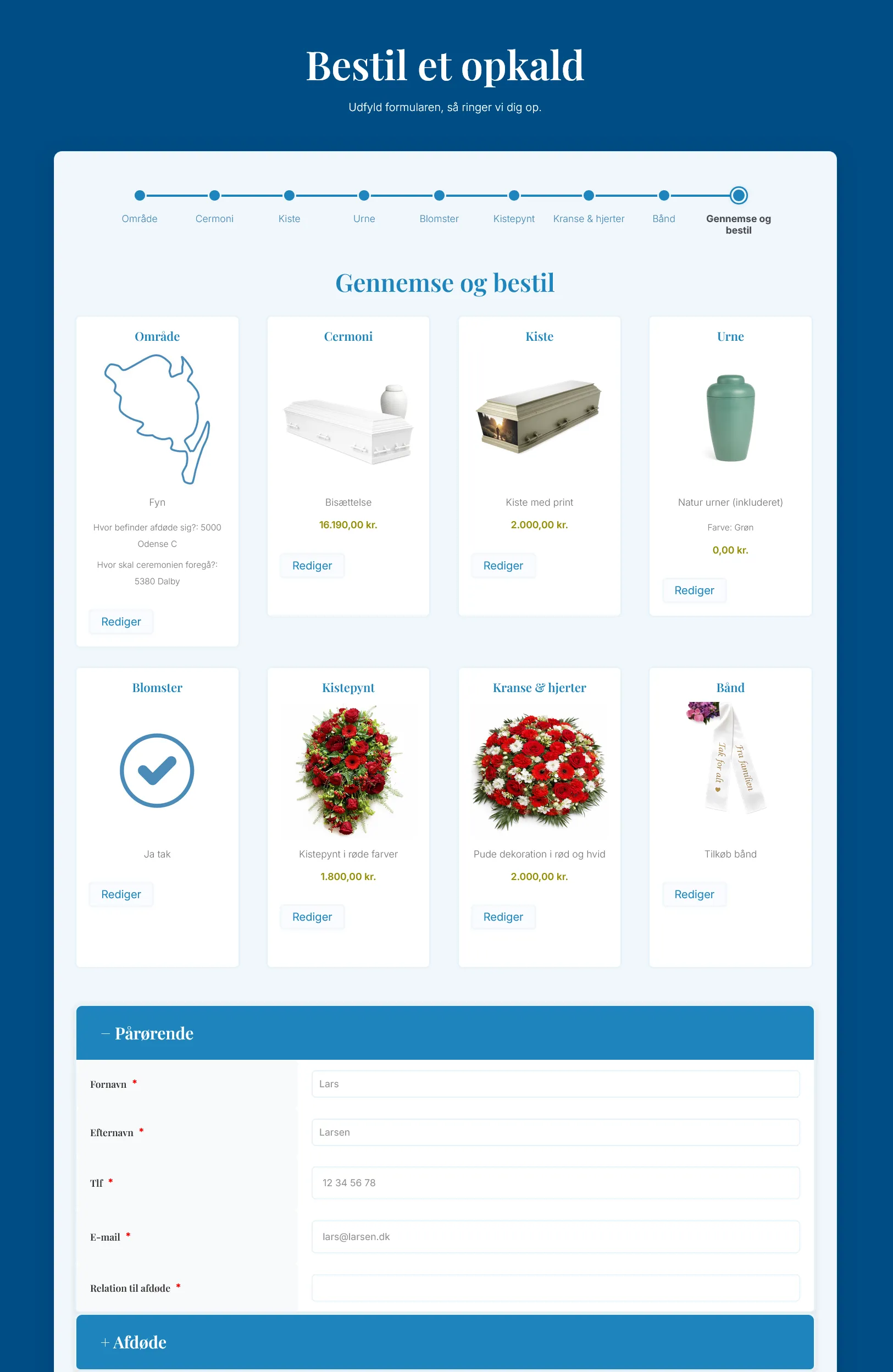
- Details only once. Composite Products repeats the form fields for every part of the order. Two filters make sure the details about the family, the deceased and the ceremony appear only once on the order.
- Fields when they’re needed. Choosing to add ribbons slides in two text fields for the ribbon text, and the text stays with the order all the way through.
- One section at a time. In the last step, the practical details are split into sections where only one is open at a time, and the form moves on to the next one by itself.
- In Danish and in the funeral home’s style. The plugin’s texts are translated with a gettext filter, several templates are overridden, and the form is styled to match the rest of the website.
- Measurement. Submitted requests are sent to Google Analytics via Tag Manager, with a guard against counting them twice.
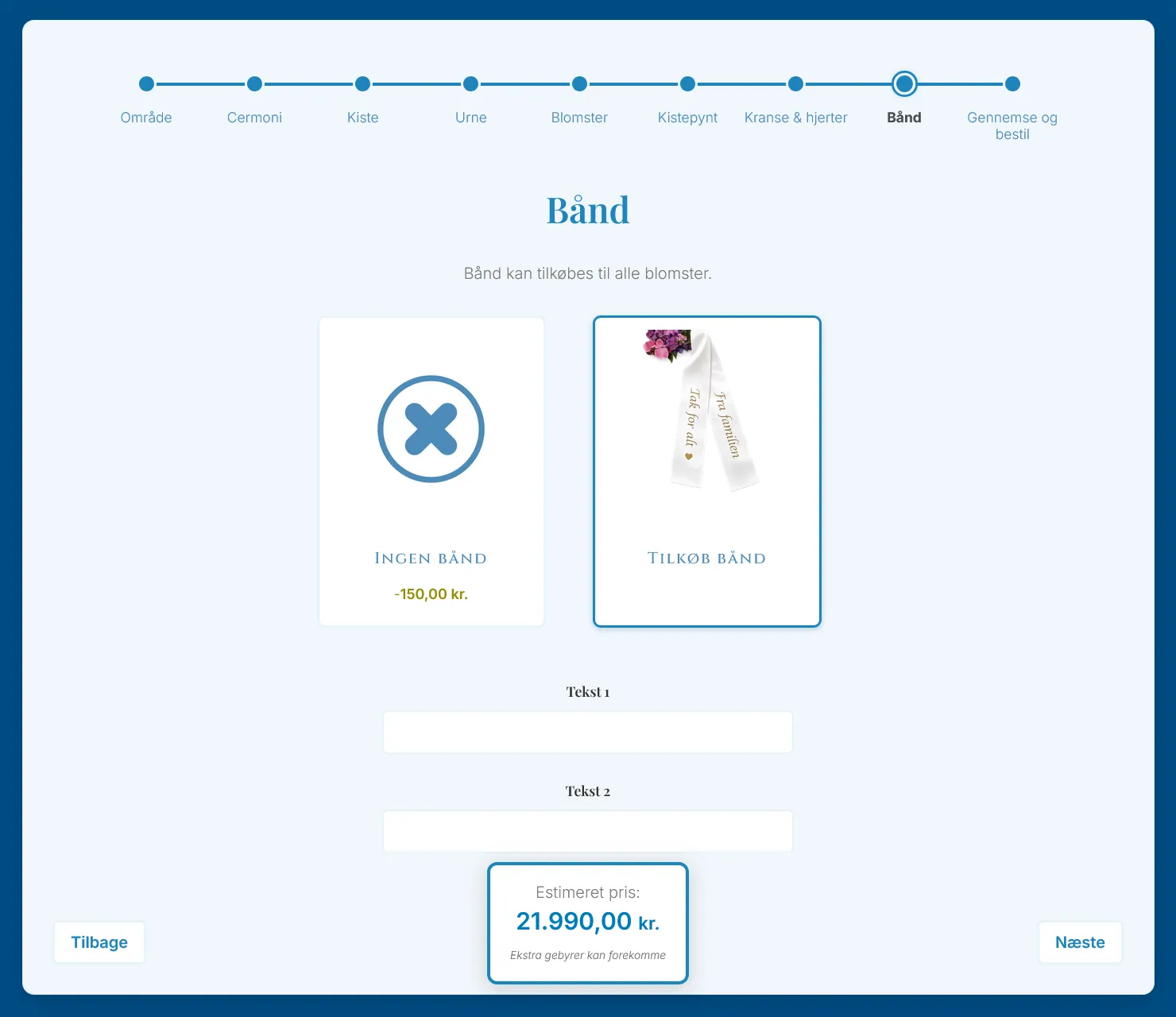
Price ranges show as “From” and the lowest price. Instead of touching the plugin, a filter changes the texts the plugin’s own JavaScript uses. “Fra” is Danish for “From”:
add_filter('woocommerce_composite_front_end_params', 'change_price_range_to_from_format', 10, 1);

function change_price_range_to_from_format($params) {
    $params['i18n_price_range_string'] = sprintf(_x('Fra %s', 'Price range - From (relative)', 'woocommerce-composite-products'), '%f');
    // … and the same for i18n_price_range_string_absolute and _plain
    return $params;
}
The floating price
The form is long, so the estimated total always needs to be visible. The price box sits fixed at the bottom of the screen and updates every time a choice changes:
- The price is read from Composite Products’ own data model. If that isn’t ready, the prices are read from the page instead and added up.
- JavaScript doesn’t understand Danish prices like 18.340,00, so they are converted to numbers and formatted back with
toLocaleString('da-DK'). - The box listens to the plugin’s own events and to step changes, and it gives a small pulse when the price changes.
Converting Danish prices, slightly shortened:
function parseDanishPrice(priceText) {
    // Strip the currency symbol and spaces
    priceText = priceText.replace(/[^\d.,]/g, '').trim();

    // Danish format: 18.340,00 -> 18340.00
    if (priceText.includes('.') && priceText.includes(',')) {
        priceText = priceText.replace(/\./g, '').replace(',', '.');
    } else if (priceText.includes(',')) {
        var parts = priceText.split(',');
        if (parts.length === 2 && parts[1].length <= 2) {
            // Decimal comma: 1234,56 -> 1234.56
            priceText = priceText.replace(',', '.');
        } else {
            // Thousands separator: 1,234 -> 1234
            priceText = priceText.replace(/,/g, '');
        }
    }

    var price = parseFloat(priceText);
    return isNaN(price) ? 0 : price;
}
The hardest part
The order flow. The choices had to travel all the way from the form through checkout to the submitted request, and show up correctly for the funeral home in WooCommerce. Composite Products splits an order into many parts, so it took a lot of debugging before every choice and field made it through. I kept tracing the data step by step and fixing things until everything worked.
The result
The form is live on the funeral home’s website. Families can see and put together the whole funeral online right away, instead of calling and filling in paper forms. When the funeral home calls back, the choices are already there.
What I’d do differently today
- Listen only to Composite Products’ own events instead of waiting with short delays (
setTimeout) before reading the price. - Move the JavaScript out of the PHP files into separate files, so it’s easier to test and maintain.
- Avoid hard-coded product IDs, so the form doesn’t break if a product is recreated.