Floor finder and square-metre pricing in Shopify
A guide on Gulvgiganten's front page that finds the right floors from four questions, and calculators that convert between square metres, packages and carpet lengths.

Brating built the Shopify store for Gulvgiganten, a Danish flooring retailer. I coded the parts the theme couldn’t handle: a floor finder on the front page and calculators for products sold by the square metre. I did it on my own over one to two months in 2025, using AI as a tool along the way.
The problem
The store has more than 2,000 products, and most customers don’t know which technical properties to look for. The store wanted a guide on the front page that asks a few questions and shows the floors that fit. Shopify has no section for that, so it had to be coded.
At the same time, floors are sold in whole packages and carpet in the full roll width, while customers think in square metres and lengths. The product pages had to do the conversion for them.
The floor finder
The floor finder is a front-page section with four questions: how hard-wearing the floor needs to be, and whether it should be water-resistant, sound-dampening and suitable for underfloor heating. Every question has a “Don’t know” answer, so nobody gets stuck.
There’s no app or custom search engine behind it. The floors’ properties are stored as metafields on the products, and Shopify can filter on them by itself. The floor finder simply turns the answers into Shopify’s filters in the URL and sends the customer on to the product list with the filters switched on. Slightly shortened:
let filterParams = [];

const slidstyrke = document.querySelector('input[name="slidstyrke"]:checked')?.value;
if (slidstyrke) filterParams.push(`filter.p.m.product.slidstyrke=${encodeURIComponent(slidstyrke)}`);

const vandafvisende = document.querySelector('input[name="vandafvisende"]:checked')?.value;
if (vandafvisende) filterParams.push('filter.p.m.product.vandafvisende=1');

// … and the same for sound dampening and underfloor heating

const collectionsUrl = document.querySelector('.gulv-filter').dataset.collectionsUrl + '/all';
window.location.href = `${collectionsUrl}?${filterParams.join('&')}`;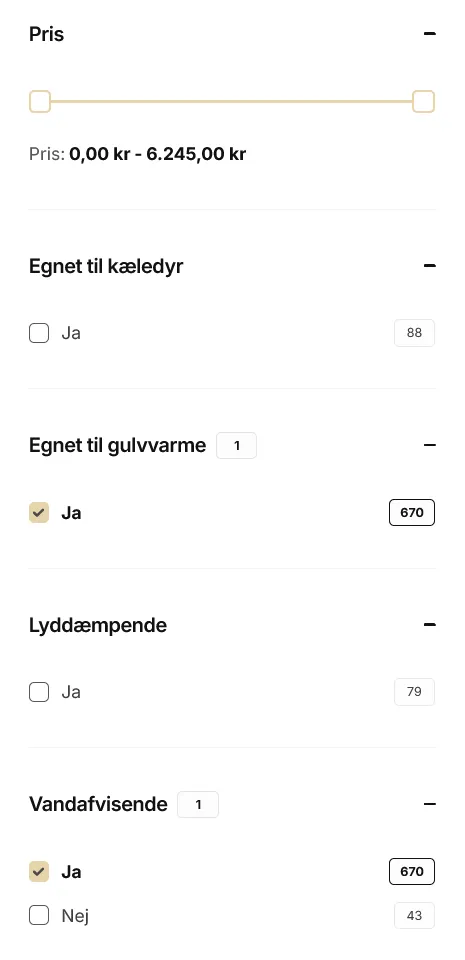
- Every question and answer can be edited in Shopify’s theme editor, so the store doesn’t need a developer to change them.
- You have to pick an answer to move on, and a message explains why if you don’t.
- A step bar and “1 of 4” show how far along you are, and the steps fade softly into each other.
Square metres, packages and carpet
Two components on the product page let customers work in the units they know:
- Floors in packages. Customers enter how many square metres they need, and the quantity is rounded up to whole packages. The fields are linked both ways, and the total updates straight away.
- Wall-to-wall carpet. Customers pick a roll width and enter the length. The area is rounded up to whole square metres, which go in the cart, and the length follows the order, so the store knows how much to cut.
Both are built as custom elements that move the theme’s own quantity field into the calculator. The cart therefore still uses the theme’s normal logic, and the calculators work on the product page, in quick view and in featured products.
Try them below. They’re recreated in React for this site, but they calculate the same way as the originals.
Vinyl flooring (demo)
DKK 629.00 per package, DKK 295.31 per m²
1 package = 2.13 m². Sold in whole packages only.
Wall-to-wall carpet (demo)
DKK 249.00 per m²
Sold in the full roll width only.
The hardest part
Fitting the calculators into the theme. A Shopify theme is a lot of code written by someone else, and the calculators had to work with the theme’s own quantity field and cart in three different places. Finding the right places to hook in is a bit of a needle-in-a-haystack job, but that wasn’t the worst part.
The worst part was that Shopify doesn’t carry code changes over when the theme is updated to a new version. The calculators would disappear with every update, so I followed up with a detailed guide on how to put the code back in.
What I’d do differently today
- Build the calculators as app blocks in a theme app extension. They live outside the theme’s code, so they survive theme updates, and there’s no need for a guide.
- Read the roll width from a metafield instead of parsing it out of the variant name, such as “400 cm”.
- Put the JavaScript in separate files instead of directly in the sections, so it can be cached and tested.